For water districts, associations and co-ops, 50 to 15,000 services
Rural water billing software that doesn’t depend on one person
WUBS (Water Utility Billing System) is hosted billing software for small and rural water systems. It puts meter reading, billing, online payments and notices in one system your office can run, even when your billing clerk is out.
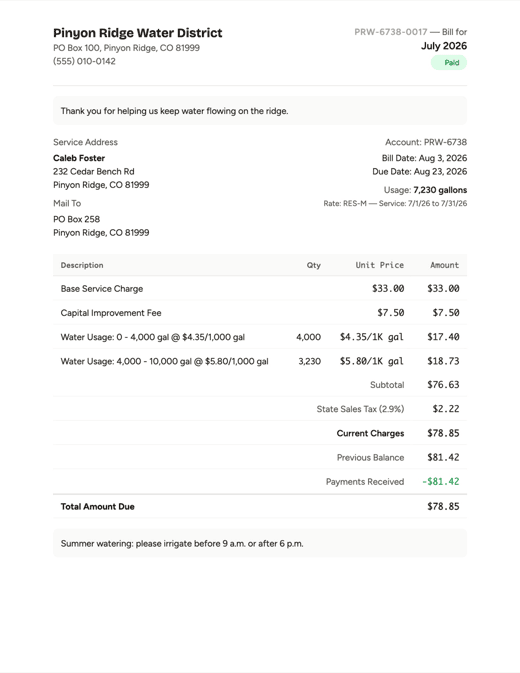
See a sample bill See a board packet
Nothing to install, and we move your records over for you.
Still running billing on spreadsheets, old office software or one person’s memory?
-
Rates, exceptions and the billing routine sit with one clerk. When that clerk is out, billing waits, because nobody else knows the steps.
-
Past-due balances are carried forward by hand, and a wrong bill gets fixed by editing old entries. When a customer asks where a balance came from, the system makes it hard for your bookkeeper to show them.
-
Customers can’t look up their own bills, charges, payments or balance, and board members can’t pull their own numbers. Both have to ask the bookkeeper, which takes up the bookkeeper’s valuable time, and then wait until the bookkeeper is free.
-
Billing software installed on office PCs that you maintain yourself ties billing to those machines. Updates, backups and repairs are up to you, and when a PC fails, billing can stop with it.
One billing cycle, start to finish
Here’s what a month looks like in WUBS.
-
Read meters
A meter reading app that works without cell service
Readers use the phones or tablets they already have. There’s no handheld to buy, and the app installs from the web browser. After the first sign-in it keeps working offline, and readings sync on their own when there’s signal again.
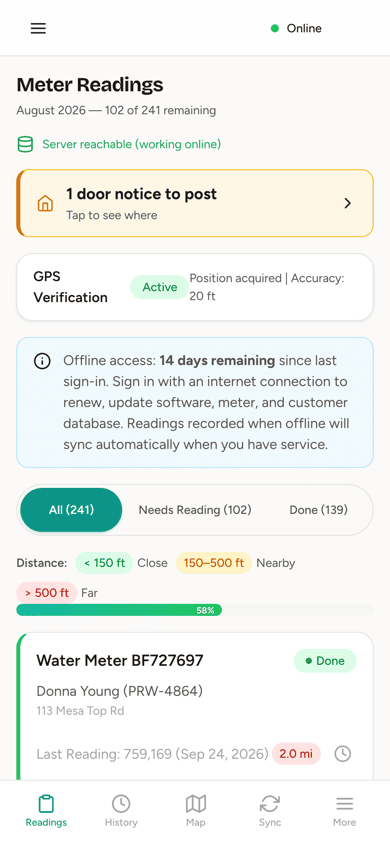
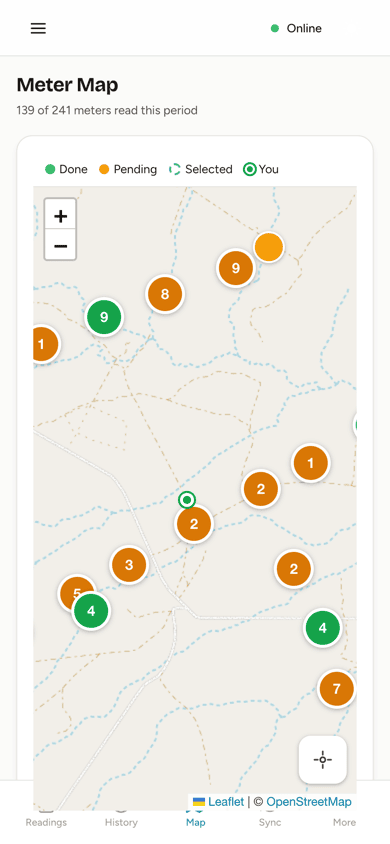
- Reading list in route order, nearest first, with a map
- GPS check against the meter’s location, and an optional photo
- Each reading checked as it’s entered: high or low use and rollovers flagged before it’s saved
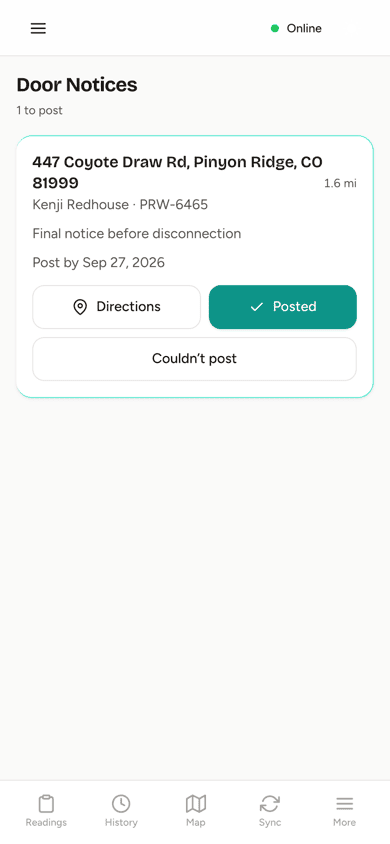
- Door notices posted from the same app
-
Review and bill
Review every bill, then generate them all
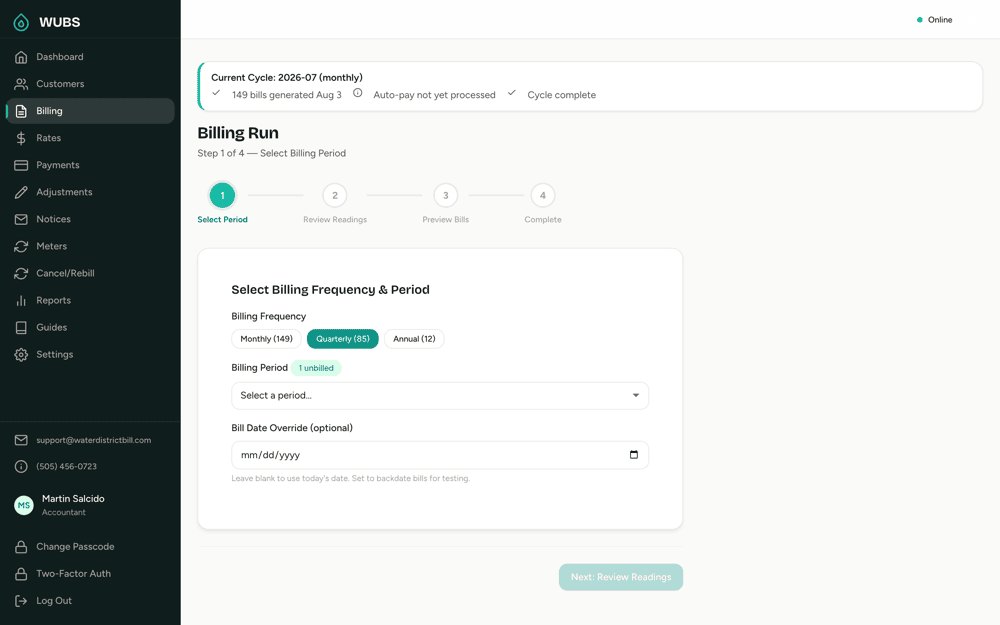
The billing run goes step by step: choose the period, review the readings, preview the bills, then generate. WUBS applies your rates and taxes, and when a customer pays late, it adds interest, a late fee or both automatically, following your board’s policies.
- Monthly, quarterly and annual accounts from the same rates
- Multiple usage tiers and fixed charges, with past, current and future rate schedules. Re-billing an earlier period uses the rates in effect at the time
- Print in batches, email bills, and post them to the customer portal
- Cancel and re-bill, with the full history kept
-
Collect payments
Payments, online or by check
Customers pay by card or bank account, set up auto-pay, or keep mailing checks. Online payments go into your district’s own account with a secure payment processor (the same kind of company that handles card payments for most businesses). Every payment goes to the oldest charges first, and the ledger shows which charges each payment paid.
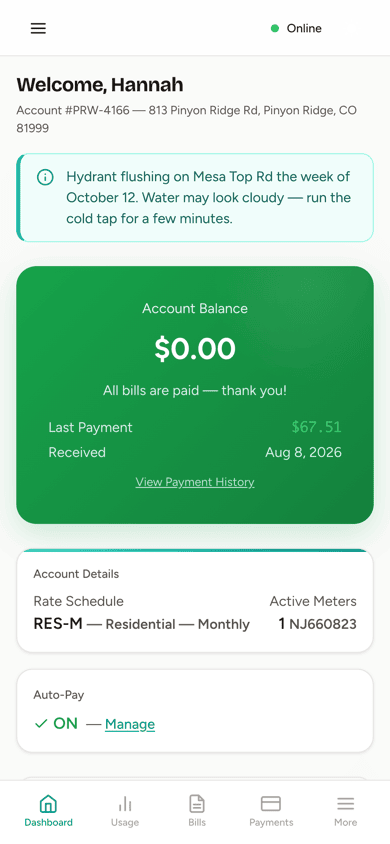
- Customer portal with bills, usage, balance and email bills
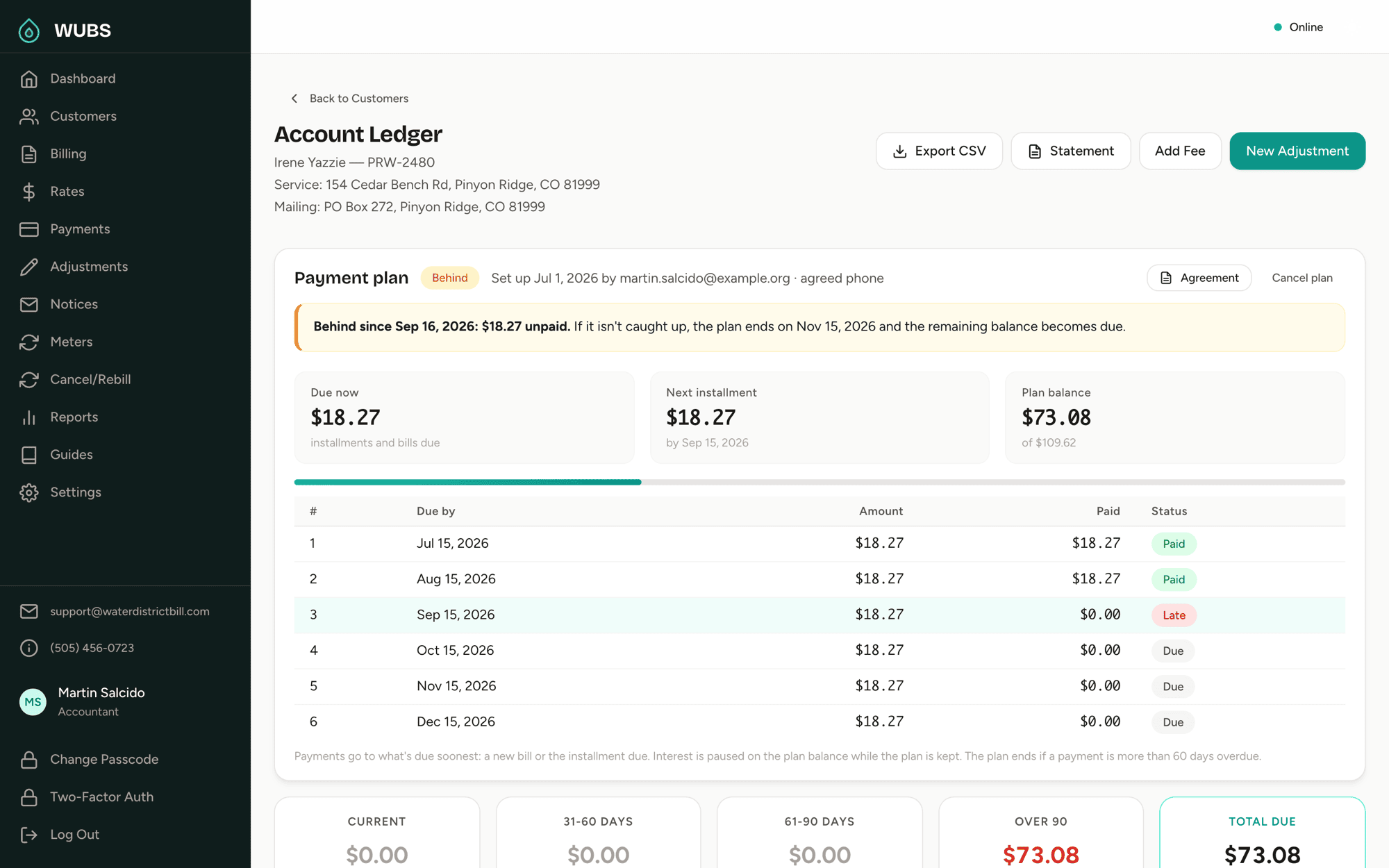
- Payment plans, with each installment tracked
- Aging from current to over 90 days on every account
-
Follow up and report
Notices and board reports
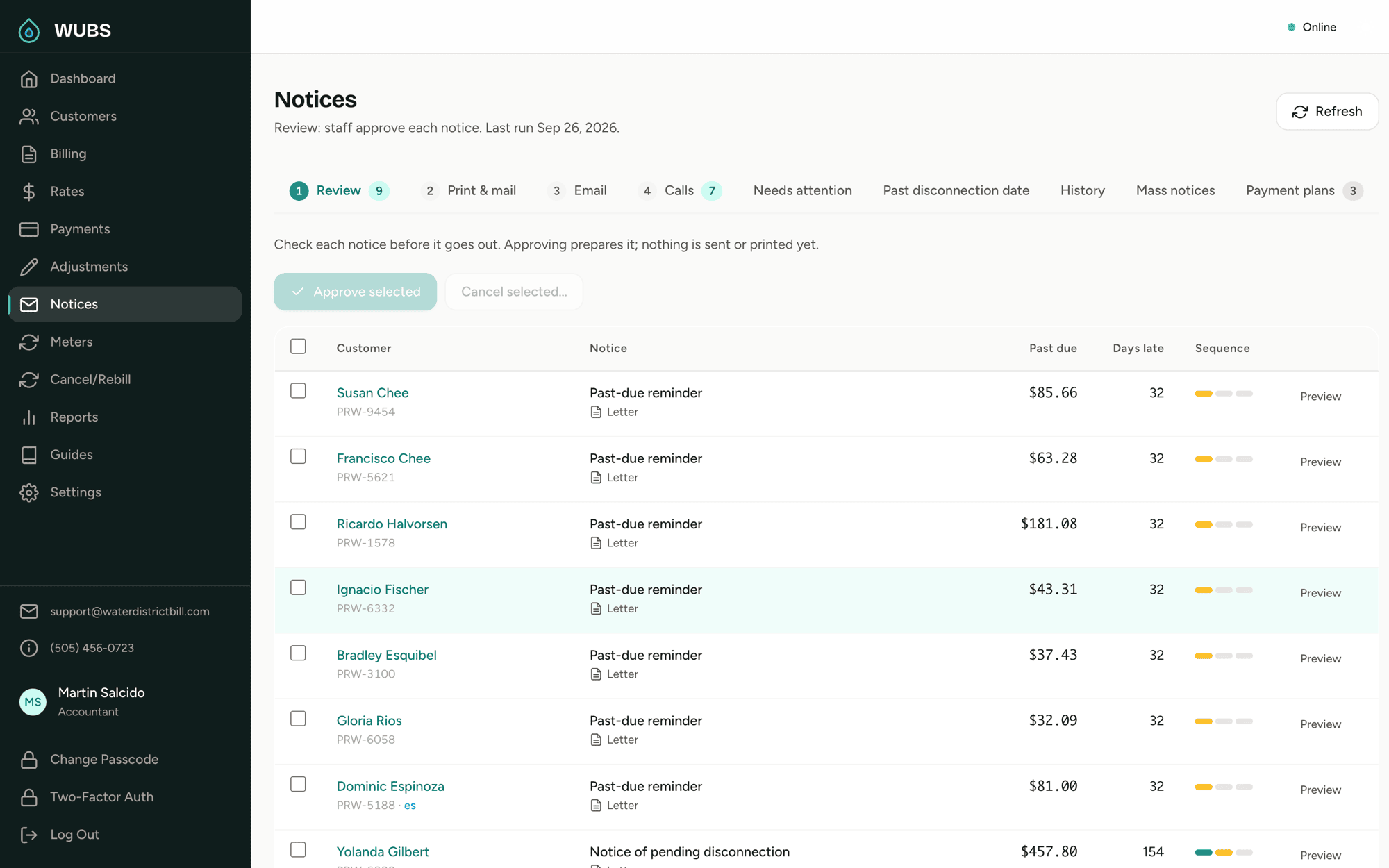
Past-due and disconnection notices, set up to follow your state’s rules. Staff review each one first, or you let them go out automatically. WUBS is built to support multi-lingual notices: each customer’s preferred language is recorded, and it comes first on their notice, in the languages your state requires.
- Send any message to all your customers, such as an outage, a rate change or a meeting notice, by email, letter or both
- A board report and PDF packet for any month or quarter
- Board members get their own login to read it
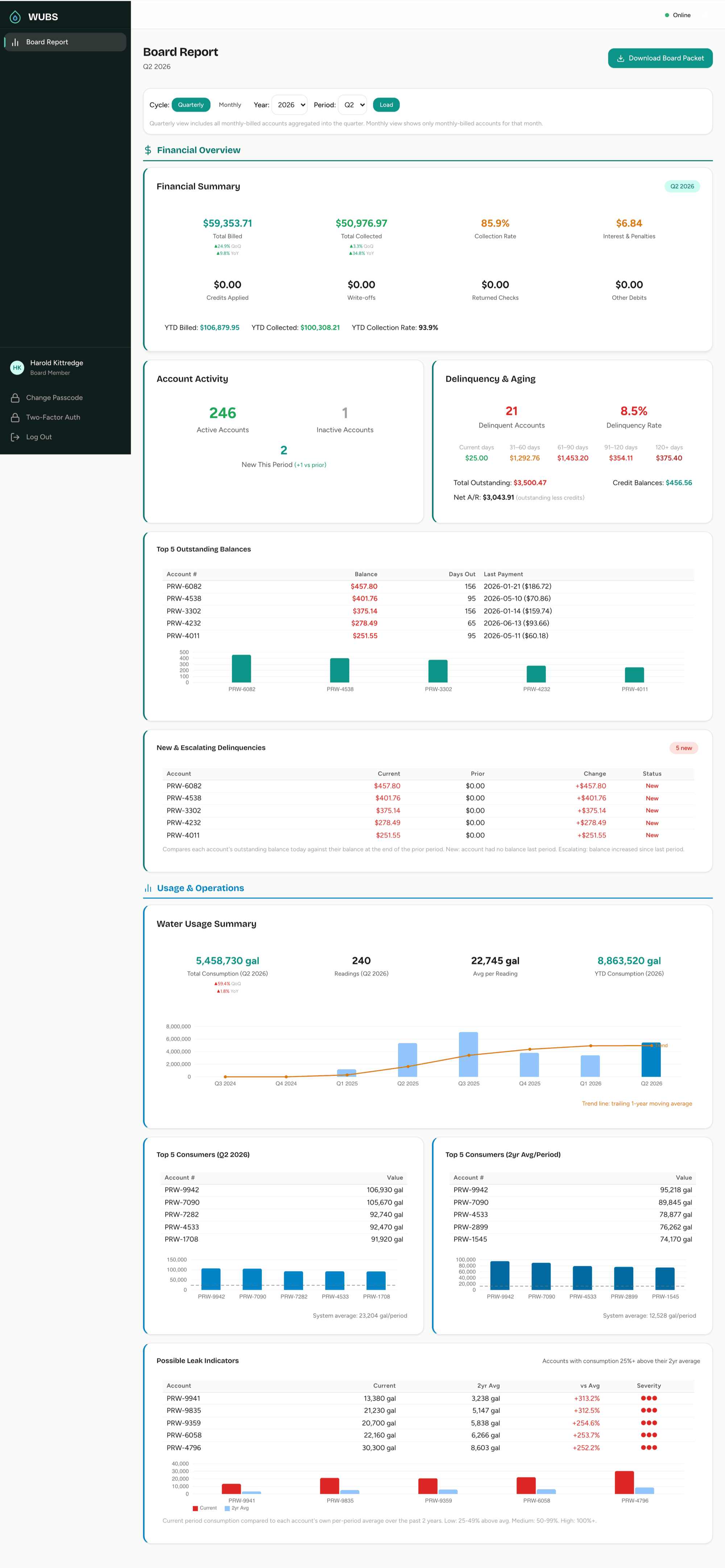
See a billing cycle from start to finish.
Who uses it
For water districts, mutual domestic water associations, rural water associations, co-ops, water supply corporations and small-town water systems. Each person gets their own login and sees the parts their role needs.
Office manager
Users, rates, settings and the whole district at a glance.
Accountant
Billing runs, payments, notices, payment plans and reports.
NoticesMeter reader
The route list, readings and door notices, from a phone.
Meter reading appBoard member
The board report for any month or quarter.
Board reports Sample packetCustomer
Bills, usage, balance, online payment and auto-pay.
Customer portal
WUBS is built to make your billing clerk’s month easier.
Who’s behind WUBS

Michael Settlage, M.S.E.E.
Founder, Water District Bill, LLC
I’m Mike Settlage. I’ve spent more than 30 years building billing, metering and operations systems for the energy and utility industry, and I’ve testified as an expert witness before the New Mexico Public Regulation Commission in 12 proceedings. I’ve also served on a water district board, so I know what it’s like to sit in that meeting and try to make sense of the numbers.
I built WUBS for small districts like the ones around me in New Mexico. When you email support, you get me.
What colleagues say
From people I’ve worked with.
“Mike’s customer service is outstanding — just like his attitude. He has designed and built several mission-critical systems to support our specialized energy contracts, addressing our real-time needs for operational data and our billing and accounting data management. Each project was implemented on schedule and is reliable.”
“Mike focuses on results rather than process. He takes a KISS approach to infrastructure solutions. His solutions simply work. They generally require very low overhead to maintain and, due to their simplicity, are able to evolve to match changing market needs.”
“Mike was critical to the integration and management of a new business to Progress Energy Ventures, serving full requirements contracts to co-op customers in Georgia. His expertise at load forecasting and dispatch management was critical to PEVs success in serving these customers.”
Switching to WUBS
We move your records over, and nothing changes for your customers until you’ve checked the numbers.
-
First
We import your records
Send your data in whatever format you have it. We import your customers, meters, balances and rate schedules, then check everything with you before you go live.
-
Then
We train your staff
Remote training for everyone who will use it, with optional on-site training. Built-in guides cover every role.
-
When you’re ready
You bill from WUBS
WUBS can run alongside your current system so you can compare bills before you switch.
Month to month after the initial term
See pricing and terms.
Your data is yours
Your district owns its records. Export ledgers, payments and reports to CSV at any time, and a complete copy of your district’s data is always available on request.
Switching from spreadsheets or QuickBooks
Send us a sample of your records and we’ll show you what the switch involves.
Pricing
You pay per active service, each month. Ask us about pricing for your district.
For districts of 50 to 15,000 active services.
After a setup fee or an initial six-month term, you’re billed month to month. Cancel with 30 days’ notice. Email support included.
What’s included
- Every role: office manager, accountant, meter reader, board member and customer
- Unlimited billing runs
- The meter reading app for phones and tablets, with offline reading
- Customer portal with online payments, auto-pay and email bills
- Past-due and disconnection notices, payment plans, and mass notices to all your customers
- The board report and PDF board packet
- Automatic interest, late fees or both on late payments, per your board’s policies
- Hosting, daily backups and updates
- Data import, setup and staff training to get you started
Security and payments
What boards usually ask before they approve a switch.
-
Payments go to your district
Card and bank payments go through your district’s account with the payment processor. WUBS never stores card or bank account numbers.
-
You can see where each payment went
Payments apply to the oldest charges first, and the ledger shows which charges each payment paid. Cancelled bills stay in the history.
-
Your data is kept separate
Every record belongs to one district, and every request is checked against it.
-
Daily backups
Automatic daily database backups, kept for at least 30 days.
-
Encrypted connections and two-step sign-in
Every connection is encrypted with TLS 1.2 or higher. Two-step sign-in by email code, text message or authenticator app is available.
-
We look after the servers
Hosted on US-based servers. We handle updates, patches and server maintenance.
Training for your staff and board
Self-paced online courses for billing clerks, meter readers and board members, whether or not your district runs WUBS.
Questions districts ask
Something else? Email support@waterdistrictbill.com or call (505) 456-0723.
How long does it take to get set up?
Expect to be up and running within one or two billing cycles. We import your customers, meters and balances, set up your rates, and train your staff remotely. Optional on-site training is available. WUBS can run in parallel with your current billing software, so there’s no gap in billing.
We’re very small. Is WUBS too much?
No. WUBS is built for districts from 50 active services up, and a small district uses the same system with less of it: a shorter reading route, a smaller billing run, fewer payments to post. The monthly cost follows your number of active services, and we host and maintain it for you.
What does training involve?
We train everyone who will use WUBS remotely, each for their own part: the office, billing, meter reading and the board. Optional on-site training is available, and built-in guides cover every role. Separately, we offer self-paced online courses for billing clerks, meter readers and board members.
Does the meter reading app need cell service?
Not while reading. A reader signs in once with a connection, and after that the app works offline: readings, GPS positions and any photos are stored on the phone and sync on their own when there’s signal again. It installs from the browser, so there’s no app store.
Where do online payments go?
To your district’s account with the payment processor. Customers pay by card or bank account on your district’s secure payment page, and the payment is recorded on their account in WUBS. WUBS never sees or stores card or bank account numbers.
Can customers view and pay their bills online?
Yes. Each customer gets their own login to see current and past bills, their balance, usage and payment history from any device. They can pay online, set up auto-pay, and choose to get their bills by email.
Can customers still get paper bills and pay by check?
Yes. Bills can be printed and mailed, and staff record check payments. An optional per-bill credit for customers who enroll in auto-pay can help move customers to online payment.
How does the billing run work?
Once readings are in, the accountant runs billing for the period step by step: choose the period, review the readings, preview the bills, then generate them. WUBS applies your tiered rates, taxes, and any interest or late fees on past-due balances.
How do you handle late payments, interest and late fees?
You set the annual rate, grace period, daily or monthly method, and minimum charge. Interest is calculated automatically on balances still unpaid after the grace period and added as a line on the next bill, which shows how it was worked out. WUBS can also add a fixed late fee, once per late bill, instead of interest or as well as it. Other fees, like a returned-check or reconnection fee, are added from your district’s fee list.
What if we need to cancel or re-bill a bill?
Bills can be cancelled and generated again with corrected readings or rates. WUBS keeps the full history: the original bill, the cancellation and the replacement.
Is there a contract or minimum commitment?
After a setup fee or an initial six-month term, you’re billed month to month. Cancel with 30 days’ notice.
How does a board usually approve a switch?
Usually by looking at three things: the cost, what happens to the district’s data, and whether billing could be interrupted. Once we understand your records, we give you a written quote, the contract terms, a sample board packet to show them, and a switching plan in which WUBS can run in parallel with your current billing software until you’ve confirmed the bills match.
Is WUBS a replacement for QuickBooks?
For water billing, yes; for your general books, no. Your water accounts receivable runs through WUBS: bills, payments, balances, aging and collections. Each month it produces a Journal Entry Summary, a double-entry journal you can import into QuickBooks or post to your general ledger. It’s an export, not a live connection.
Can we export our data?
Yes. Your data is always yours. Ledgers, payments, adjustments and reports export to CSV at any time, and a complete copy of your district’s data in a standard format is always available on request.
Who do we contact when something’s wrong?
Email support@waterdistrictbill.com. It comes straight to the person who built WUBS.
See how WUBS fits your district
Tell us a little about your district and we’ll set up a demo. We reply within one business day.
Or call (505) 456-0723
or email support@waterdistrictbill.com
Your request is in
Thank you! We’ll be in touch within one business day.
While you wait:
- See a sample bill
- See a board packet, the kind of report your board would get
- Rather talk? Call (505) 456-0723