Delinquency and shutoff notices on your district’s schedule
Every day WUBS brings each account’s past-due status up to date and prepares the next notice when it’s due: a past-due reminder, a notice of pending disconnection, or a final notice posted at the door.
WUBS never disconnects anyone. It prepares, dates and records the notices; what happens next is your district’s decision.
How the past-due notice sequence works: an example
Notices go out one step at a time. Each step waits for the one before it to be delivered, and for its own day. The days below are only an example; your district sets its own notice types, timing and wording in Settings, to match the utility billing policy your board adopts.
Day 15 past due
Past-due reminder
By email and letter, asking for payment within 10 days.
Day 45
Notice of pending disconnection
By email and letter, at least 7 days after the reminder. It gives a disconnection date 7 business days out.
Day 55
Final notice before disconnection
Posted at the door and followed by a phone call, with a disconnection date 2 business days out.
Not before day 60
Earliest disconnection date
No notice shows a date sooner than your minimum, and a later notice never states an earlier date than the one before it.
Example only. These days are WUBS’s starting settings, and every step starts switched off. Your district sets its own notice types, timing, minimum amounts, delivery methods and wording in Settings, and turns notices on when it’s ready.
Review each notice first, or send them automatically
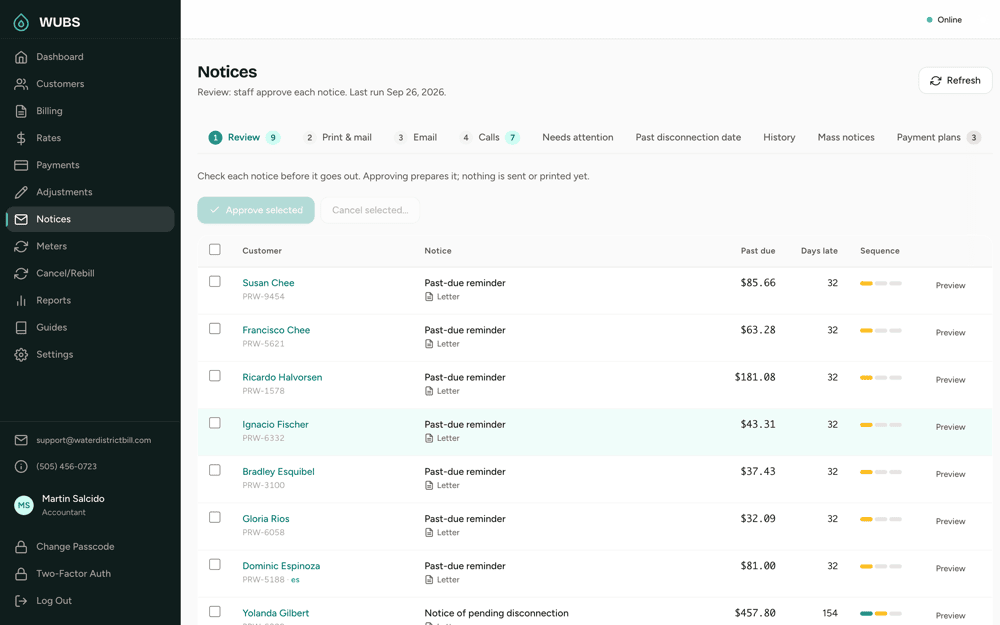
Review first is the default: staff approve each notice on the Notices page before anything is printed or emailed. In automatic mode, the daily job approves notices and sends the emails; letters and door notices still wait for someone to print them.
Every notice is checked again at each step. If the customer paid, fell below the step’s minimum, or went on a payment plan, the notice is cancelled instead of sent, and the reason is kept. When a step goes by letter and email, the email waits until the letter is marked mailed, so both state the same dates.
Returned mail, failed emails and logged phone calls are tracked on the same page, and a separate list shows accounts still past due after the disconnection date on their last notice.
Business days and holidays
Disconnection dates count business days: Monday to Friday, less your district’s holidays. Add a year’s US federal holidays in one step, remove any your office works, and add your own. WUBS won’t date a disconnection notice for a year with no holidays set, and it reminds you in November and December to add next year’s.
Mass notices to all your customers
Use the same Notices area to send a message to all your customers, such as a main shutdown, a boil-water notice, a rate change, a board meeting or an office closure. Save a message once and send it again whenever it’s needed, by email, printed letter or both, from one place.
A mass notice adds to any public notice your state requires for an emergency or a rate hearing. It doesn’t replace it.
Door notices, posted by your meter readers
See the meter reading app.
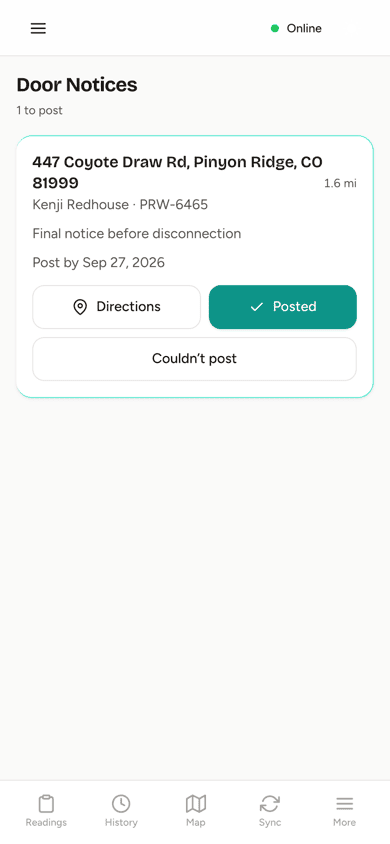
Printed door notices appear in the meter reading app with a post-by date: the last day a notice can go up and still give the full notice before its disconnection date. Readers record Posted or Couldn’t post at the door, with the GPS position and an optional photo, and the notice counts from the day they were there.
If the account is paid before the notice is posted, WUBS cancels it and it disappears from the reader’s list. Office staff can also post door notices themselves and confirm the batch.
Built for multi-lingual notices
WUBS is built to support multi-lingual notices. Each customer’s preferred language is recorded: customers pick it in their portal, and staff can also set it. You list the languages your state requires, in order, and when a customer’s preferred language is on your list, it comes first on their notice.
Income-qualified households
Record which households qualify for extra protections under your district’s rules, and the program or income test they qualified under. You can let customers declare it themselves in the portal, set how often it must be renewed, and see who is due to recertify in the next 45 days. Only office staff, and the customer, can see it.
Payment plans
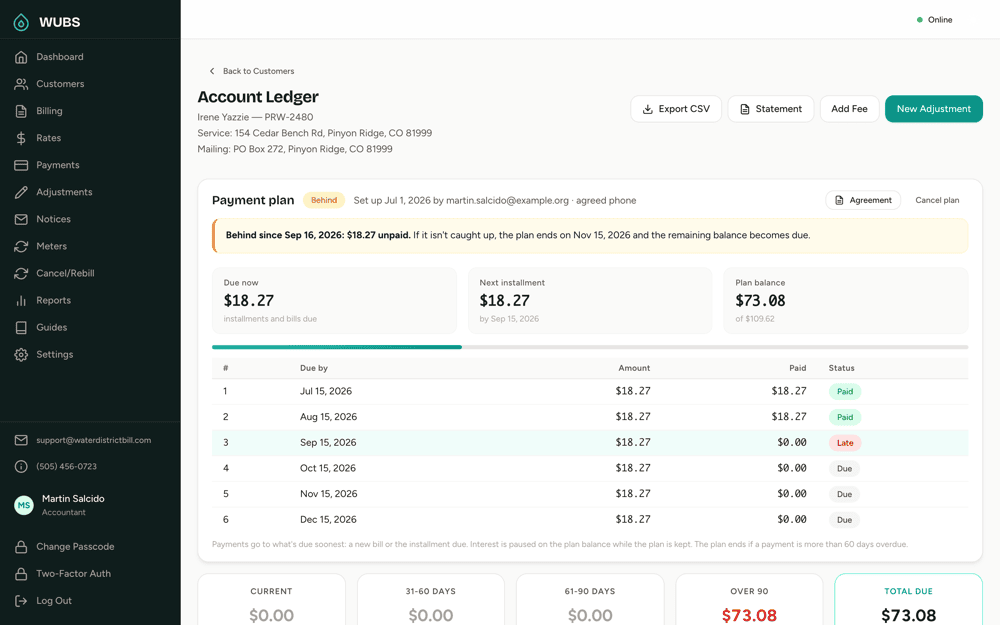
Spread a past-due balance over monthly installments while the customer keeps up with new bills. WUBS prints an agreement letter, tracks each installment, and flags plans that fall behind. While a customer keeps to a plan, no past-due notices go out; if they fall behind, they get reminders only, never a disconnection notice. Your district can also pause interest on plan balances.
Late fees and interest
When a customer pays late, WUBS adds interest on the past-due balance, a fixed late fee once per late bill, or both, automatically and per your board’s policies. Interest follows your annual rate, grace period and daily or monthly method, and appears on the next bill with how it was worked out.
A late fee is added once to each bill still unpaid a set number of days after its due date. A deadline that falls on a weekend or holiday moves to the next business day, and a late fee on its own never triggers a notice. Other fees, like a returned-check or reconnection fee, come from your district’s fee list.
Notice questions
Does WUBS shut off anyone’s water?
No. WUBS prepares, dates and records notices, and lists the accounts still past due after the disconnection date on a notice they received. Whether and when to disconnect is your district’s decision.
Does WUBS follow our state’s disconnection rules?
Your district sets the notice timing, minimum amounts, delivery methods, languages and wording, so they can follow your own policy. Rules differ from state to state, so check your state’s requirements when you set them up.
Can we change the wording of our notices?
Yes. The Office Manager edits each notice’s wording, with fields that fill in each customer’s name, amounts and dates. Changes are saved as a draft and previewed before they’re published, and notices already sent keep the wording they went out with.
What happens if a customer pays after a notice is printed?
WUBS checks the account again before every step. A notice that hasn’t gone out is cancelled, with the reason kept. A printed door notice is cancelled and taken off the meter readers’ list, so nobody posts it on a paid-up account.
Related
Walk through a notice cycle in a demo
We’ll show the Notices page for a demo district, from the first reminder to a door notice on a reader’s phone.