A meter reading app that works where there’s no signal
Readers add WUBS to the phones and tablets they already carry, straight from the browser. After one sign-in with a connection it keeps working offline, and every reading syncs on its own when there’s signal again.
Part of WUBS: readings go straight into the billing run, with no retyping from paper sheets.
Working without cell service
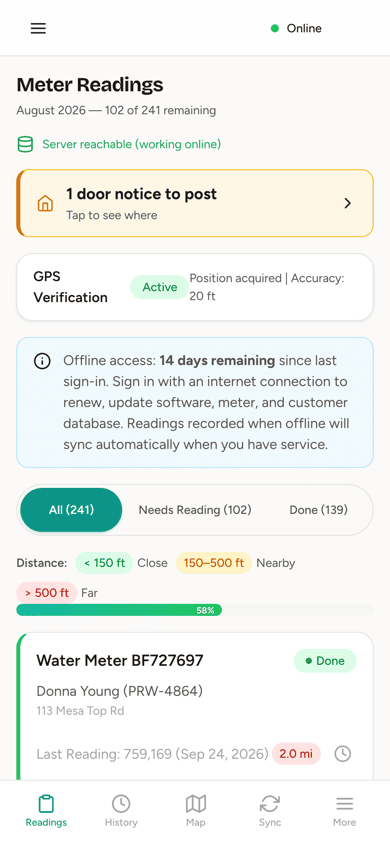
The first time a reader signs in on a phone, with a connection, WUBS copies the route to it: meters, customers, past readings and door notices. From then on, the reader can sign in and work with no signal at all for 14 days. Every online sign-in resets the 14 days and refreshes the data.
A reading is saved on the phone the moment the reader taps Save, along with its GPS position and any photo. WUBS uploads it in the background as soon as there’s signal, and keeps trying until the office has it. Logging out, closing the app or an app update doesn’t lose anything waiting to upload.
Offline sign-in works for the last reader who signed in online on that phone. If readers share a device, each one signs in with a connection before heading out.
Installing the app
WUBS runs in the phone’s web browser. A reader opens your district’s WUBS address, signs in and adds it to the home screen, where it opens like any other app. There’s no handheld to buy and nothing to download from an app store. The office adds each reader under Users, and the reader gets an email invitation to set a passcode.
Updates arrive on their own. When a new version is ready, the reader sees a message and taps Reload at a good stopping point. Readings waiting to upload are kept through the update.
A reading list in route order, with a map
The Readings screen shows the month being read, how many meters are left, and a progress bar. Filters show just the meters that still need reading, or the ones already done. Meters are listed in your route order; where meters share a route position, the nearest one comes first.
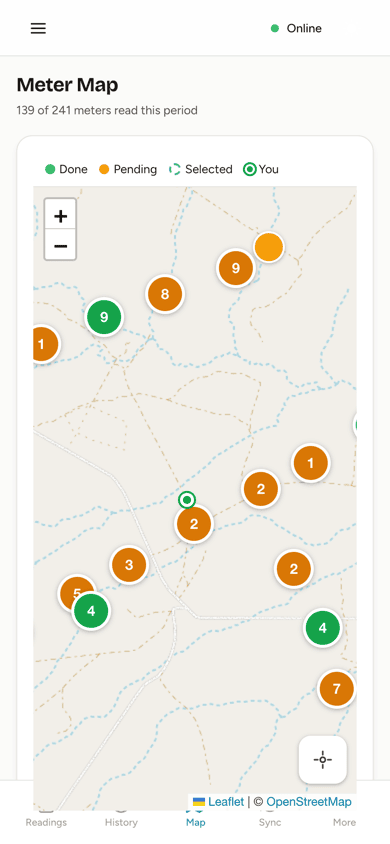
The map shows every meter that has a location on file, green for done and amber for pending, with the reader’s own position. Tap a meter to see its details and enter the reading. The map also works offline for areas the phone has already loaded.
GPS distance check on every reading
When a reader opens a meter to take its reading, WUBS shows how far they are from that meter’s location on file, in three bands:
A reading taken within about 150 feet of the meter is marked GPS verified for the office. Readers can still save from any distance, and the distance is recorded either way.
Whenever the phone has a good GPS fix (about 50 feet or better), the reader is offered a one-tap Update Meter GPS, so a meter whose location on file is off can be corrected by standing at it. A meter with no location on file yet takes its position from its first reading with a good fix, unless the reader unticks that.
Photos are optional. A reader takes one when something looks off, and it’s kept with the reading.
Each reading checked before it’s saved
WUBS checks each reading as the reader enters it, so a slip can be caught at the meter, before the reading is saved. The usage since the last reading shows as soon as the number is in, and WUBS compares it with the meter’s average over its last six readings. More than twice the average raises a high usage alert: “Possible leak or misread?” Less than a fifth of it raises a low usage alert: “Meter may not be working or property vacant.” The reader can check the dial again while standing there.
Alerts never stop a reading from being saved. They’re kept with it, so the office can follow up on a possible leak before the bill goes out.
- Type the number, or turn odometer-style dials to match the meter face
- A reading lower than the last one shows as a meter rollover, with the usage worked out, so a real rollover bills correctly and a mistyped number stands out
- Record a meter exchange in the field: final reading, new meter, reason
- Look up any customer’s reading history and usage trend
Door notices
Part of delinquency and shutoff notices in WUBS.
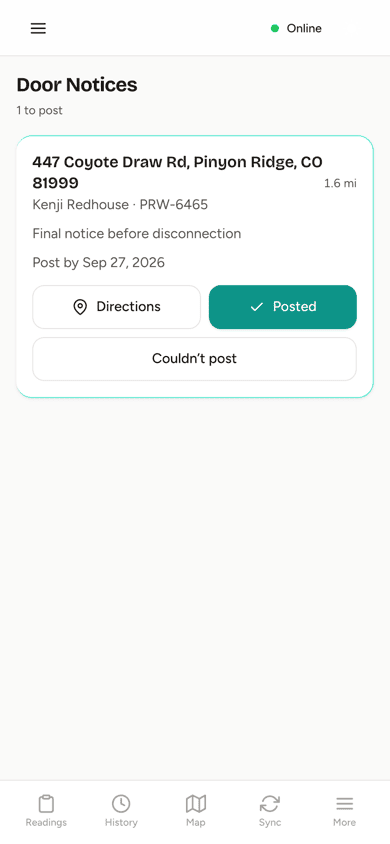
When the office prints a disconnection notice that has to be posted at the property, it appears on the reader’s Door Notices screen with the address, directions and the last day it can be posted. Only what’s needed to find the door is shown, never the amount owed.
At the door, the reader taps Posted, or Couldn’t post with a reason such as a locked gate or a dog. WUBS records the time and GPS position, with an optional photo and notes, even offline. If the customer pays before the notice goes up, it’s cancelled and drops off the reader’s list.
Meter reading app questions
Does the meter reading app need cell service?
Only for the first sign-in on a phone and for uploading. After an online sign-in, readers can sign in, read meters, take photos and post door notices with no signal for 14 days. Everything is stored on the phone and syncs when there’s signal again. A reader who signed in offline signs in once more with a connection to finish the upload.
Do readers have to photograph every meter?
No. Photos are optional. Readers take one when something looks wrong, and it’s kept with the reading. The GPS position is recorded with every reading whenever the phone can find one.
What if a reader saves the wrong number?
They tell the office. A saved reading can’t be changed on the phone, because a bill may already have been made from it. The office records a correction, which billing uses in place of the wrong reading, and the original stays on file.
How does the office know a meter was really read?
Each reading carries the date, who read it, and, when the phone had a position, where the reader was and how far that was from the meter. Readings taken within about 150 feet of the meter are marked GPS verified.
Related
See the reader app on a demo route
We’ll walk through a demo district’s route, from the reading list to the bill it produces.